WorkBuddy Enterprise Edition Hands-on Course Wraps Up in 2 Days: From Advanced Features to Enterprise Asset Accumulation

 · Jiecheng Center  · 20 次浏览
WorkBuddy Enterprise Edition Hands-on Course Wraps Up in 2 Days: From Advanced Features to Enterprise Asset Accumulation

When a company decides to "adopt AI", it usually starts by opening accounts. Six months later, a review often reveals that fewer than three features are actually being used, and the rest of the budget has turned into a string of accounts nobody logs into. The problem is rarely that the tool is not powerful enough — it is that nobody has answered the prerequisite question: what exactly are we asking AI to solve?

So instead of starting the course by listing what WorkBuddy can do, we began by understanding where each company actually stands.

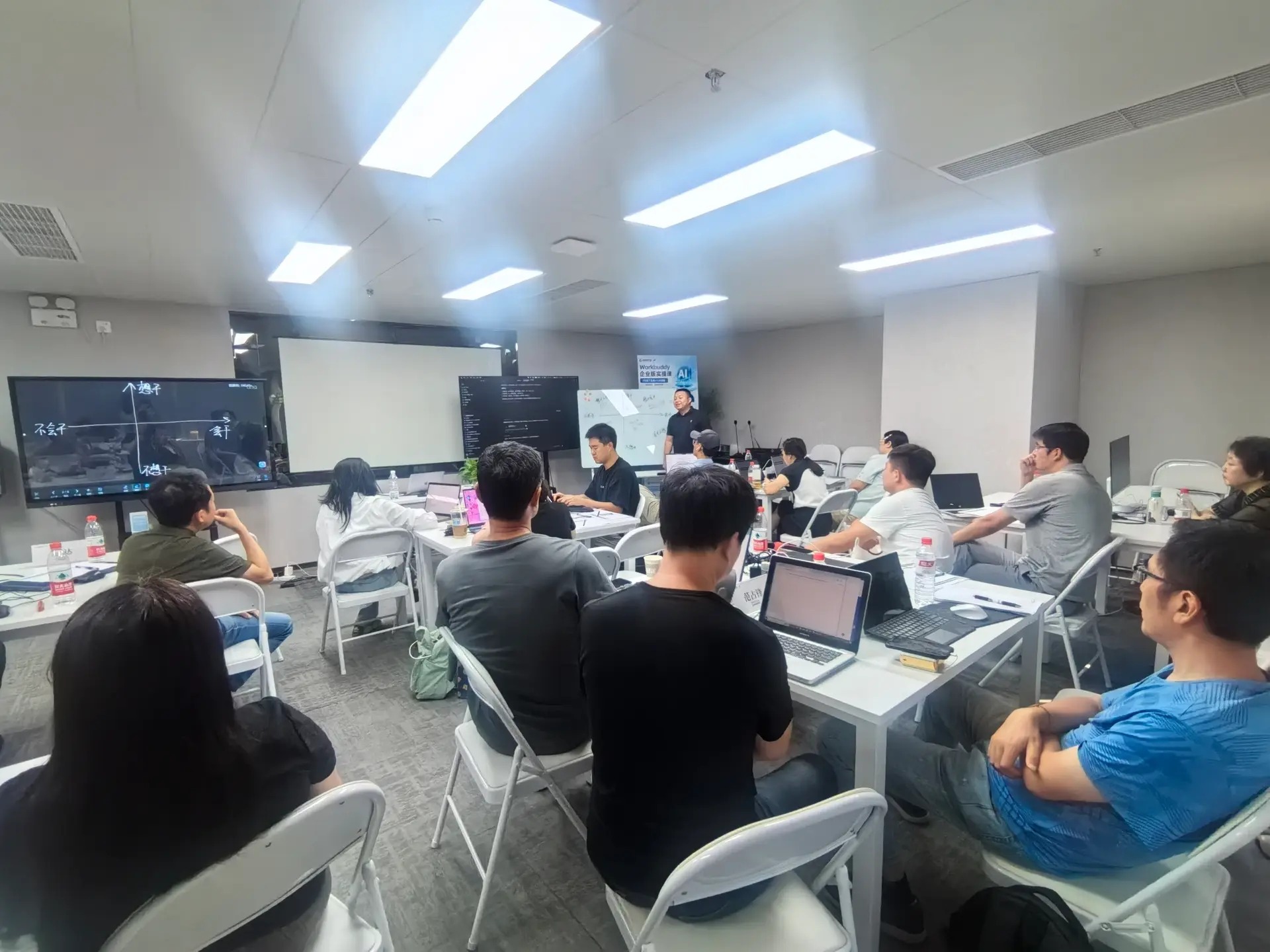
On September 4–5, 2026, the WorkBuddy Enterprise Edition hands-on course completed two days of on-site teaching at Jiecheng Center, Room 1018, Block B, Fenglian Plaza, Chaoyangmen. The two days covered a lot of ground: day one broke down WorkBuddy's advanced features — how assistants, projects, experts, and connectors are used and combined; day two tackled three harder topics — how to build an enterprise knowledge base, how to do data distillation, and how to accumulate enterprise assets.

This article distills the parts of the two-day course that carried real substance. Those who were not there take away the method; those who were can use it as a review outline.

WorkBuddy Enterprise Edition hands-on course on-site

1. Diagnose First, Then Teach the Tool: We Inverted the Structure

The pre-course questionnaire was for positioning, not statistics

Before the course began, we sent each participant a short questionnaire asking only three things:

  • Which parts of your business already use AI, and with what tools?
  • Where do you get stuck — nobody knows how to use it, answers are unreliable, or you dare not put it into real operations?
  • If you had to pick one problem you most want solved, which would it be?

These three questions look simple, but their real purpose is to align the two lists — "what AI can do" and "what your company should do". Most companies get stuck not because AI falls short, but because these two lists have never been compared side by side.

Among the answers we collected, the high-frequency pain points clustered into a few types: internal materials too scattered to find, repetitive document organization eating up large amounts of time, veterans' experience that cannot be passed to newcomers, and inconsistent messaging between support and sales. The common thread is this — none of these are solved by "a stronger model"; they require method.

Live analysis: translating generic capability into your specific scenario

Armed with these questionnaires, both day one and day two reserved fixed blocks of live analysis. What we did was straightforward: we laid out participants' pain points one by one and judged three things on the spot —

  1. Can AI solve this problem?
  2. If yes, what does it need — a knowledge base, an expert, or a connector?
  3. If not, where exactly is the blocker?

Judging "cannot be solved" matters as much as judging "can be solved." One participant asked whether AI could directly replace an approval step. Our on-the-spot call was no — that is not an AI problem but a process whose accountability was never clarified; forcing AI on top would only freeze the chaos in place. This kind of "don't push here" advice is often worth more than teaching a new feature.

2. Day One: Assistant, Project, Expert, Connector Are Four Layers, Not Four Features

This was the core of day one, and where the most people had previously gone wrong.

Most people open WorkBuddy and only use the outermost layer — the chat box. Ask a question, get an answer. Used this way, WorkBuddy is no different from any chat AI. The real difference lies in the four layers beneath:

  • Assistant is the executor. It does the concrete work, but how well it performs depends entirely on what you equip it with.
  • Project is the context container. The same assistant behaves completely differently inside different projects — because the project defines its knowledge boundary, task goals, and output standards.
  • Expert is the domain persona. It hard-codes a role's experience, judgment criteria, and output format, so the AI's answer is no longer "universally correct nonsense" but a judgment carrying a role's perspective.
  • Connector is the hands and feet. Without a connector, the AI can only spin within the information you paste in; with a connector, it can actually read your systems, query your database, and write back to your tools.

Most companies underuse AI because they treat these four as four parallel features, rather than as one combination.

The correct usage is a chain: use an expert to define role standards → feed it the company's own knowledge inside a project → attach a connector to the real data source → let the assistant execute. Drop any link, and the output degrades into an answer that merely "looks about right".

In class we had participants build this chain with their own hands. The difference afterward was obvious: the same question, answered in a bare chat box versus in an environment with expert + project + connector configured, differed in quality by an order of magnitude.

3. Day Two: From "Knowing How to Use It" to "Accumulating"

If day one solved "how to make AI answer accurately", day two solved "how to make that accuracy not depend on any single person".

Enterprise knowledge base: think first about what to feed it

Most companies' first instinct is "upload all the documents". That is a trap.

The ceiling of a knowledge base's quality is set by how clean what you feed it is. If you cram in three years of meeting notes, five versions of policy files, and a pile of expired product manuals, what the AI learns is noise — and its error rate actually goes up compared to having no knowledge base at all.

The method taught in class works backward from the scenario: first decide what kind of questions this AI must answer, then find the minimal corpus that supports those questions. Better to start small and accurate, then expand slowly — don't aim for completeness on day one.

Data distillation: turning noise into fuel

This was the densest part of day two.

The vast majority of raw enterprise data cannot be used directly: duplicate spreadsheets, abbreviations only the person involved understands, fragmentary conclusions buried in chat logs, and obsolete versions nobody deleted. Data distillation processes these raw materials into something the AI can truly absorb:

  1. Deduplicate and clean — where the same thing has multiple versions, establish the single trusted source.
  2. Structure — organize information scattered across spreadsheets, documents, and conversations into a consistent format.
  3. Label and associate — mark clearly what is fact, what is judgment, what is an exception, and link related items together.
  4. Validate — test with real questions; when it answers wrong, go back and supplement the corpus or fix the structure.

There is no shortcut here, but it determines everything after. Skipping distillation and building the base directly is like moving trash into a prettier room.

Enterprise asset accumulation: letting experience stop walking out with people

With the knowledge base built and data distillation done, the final step is to turn it into an asset that keeps appreciating, not a one-off project.

The test is simple: if a veteran left tomorrow, would what's in their head still be in your system?

Accumulated enterprise assets have three traits: newcomers can get up to speed quickly from them, departing veterans cannot take them away, and the longer they are used the more accurate they become. Achieve this, and AI moves from "tool" to "part of the organization's capability". This is also why we put asset accumulation last — it is the finish line of the first two days, and the starting point after returning to the company.

4. What Participants Took Away After Two Days

Not how many shortcuts they memorized, but three things they can use directly:

  • A project built around their own company's scenario — not a classroom demo example, but a real configuration matching the pain points they filled in themselves.
  • A cleaned corpus that can be fed to AI directly — distillation done on the spot, no redo back at the office.
  • An expert configured with industry judgment standards — role experience hard-coded so the rest of the team can reuse it.

The common thread of these three: pick up where you left off at your desk, no new project required. This is also why we designed the course as "hands-on" rather than "lecture" — listening through it from a chair and producing it with your hands are two different things.

Another clear gain on site was the mutual inspiration among peers. The same phrase "can't find internal materials" yields completely different solutions for someone in consulting versus someone in retail. This cross-industry contrast is the part online courses can hardly replicate.

5. The Four Most-Asked Questions On Site

Collected here for readers who were not present.

Q: We have no dedicated technical team — can we actually build this?

A: Yes. The course was designed from the premise of zero code; from building projects to configuring experts to doing distillation, no programming is needed throughout. What you really need is not a technician but the person who understands the business best — they know which answers are right, and that judgment cannot be outsourced to IT.

Q: Once the knowledge base is built, who maintains it?

A: This is the most easily overlooked question. The recommendation is to explicitly assign a business owner, rather than dumping it on administration or IT. A knowledge base rots faster than you think; without someone accountable, it becomes a pile of expired documents within half a year. Maintenance cost is low, but someone must own it.

Q: What if the AI answers wrong?

A: First accept the premise: it will answer wrong. The key is to treat errors as input — every wrong answer means either missing corpus, a structural problem, or unclear expert judgment criteria. Building a "mistake log" mechanism is more realistic than chasing a perfect first try.

Q: Is our data safe inside the AI?

A: This question has two layers. On the compliance side, sensitive information must be classified first to decide what may and may not go in; on the technical side, choose a solution that supports private deployment or clearly defined data boundaries. Don't stay stuck in pilot mode out of safety worry — what matters more is to start classifying data first.

6. The Companion Track Continues

The two on-site days are over, but the companion track continues. For the period ahead, we will keep following up on how participants land the work back in their companies — answering questions as they arise, and gradually organize the scenarios that get validated.

The course content has been delivered, but the real test is inside the company. Only when an AI digital employee runs stably for a month inside your daily workflow can it be called truly landed.


In Closing

What two days can cover is ultimately limited. The core this course wanted to convey really comes down to two sentences:

First, think clearly about what problem to solve before discussing which tool to use. Reverse the order and the more you invest the more you waste.

Second, AI's value is not in one stunning answer, but in whether it can accumulate into the company's asset. The former is a demo effect; the latter is competitive edge.

The course may end, but doing these two things is only just beginning.

—— Jiecheng Center

原文链接: https://www.jiechengcenter.com/news/workbuddy-course-enterprise-assets